Tinder created the modern mobile matchmaking format in 2012 by introducing the double opt-in card swipe. Acquired and expanded under Match Group, it remains the largest consumer dating network globally, with millions of active profiles spread across more than 190 countries. By letting users swipe right to express interest and swipe left to pass, Tinder removed the friction of traditional personal ads and long essay directories.
Navigating Tinder successfully requires understanding its fast, high-volume environment. Because barrier to entry is minimal and creating an account takes less than two minutes, the platform contains a massive mix of intentions, ranging from spontaneous casual meetups and travel companions to monogamous dating and marriage. The core platform costs nothing for downloading, matching, and two-way direct messaging. However, Tinder aggressively monetizes user visibility through three primary paid tiers—Plus, Gold, and Platinum—alongside its ultra-exclusive Tinder Select tier and consumable tokens like Boosts and Super Likes. The service is best suited for proactive daters who understand mobile photo optimization and want maximum local choice, provided they have the patience to filter out inactive cards, low-effort conversationalists, and commercial bots.
| Feature / operational layer | Platform score | Practical takeaway for daters |
| Interface & swipe mechanics | 4.9 / 5.0 | The gold standard for fast mobile card decks, with matching functionality on desktop web. |
| Active user pool | 5.0 / 5.0 | Unrivaled candidate volume across suburban, college, and major metropolitan markets worldwide. |
| Relationship intent range | 4.1 / 5.0 | Diverse user goals spanning casual flings, social exploration, open relationships, and marriage. |
| Free version usability | 3.9 / 5.0 | Daily swiping, mutual matching, basic discovery radius, and full direct texting cost nothing. |
| Pricing structure | Tiered subscription + tokens | Dynamic regional pricing ($9.99 to $49.99/mo for standard tiers; multi-month terms lower monthly rates). |
| Account safety & verification | 4.0 / 5.0 | Video selfie verification and automated photo screening, balanced against strict automated ban rules. |
| Overall recommendation | Essential / baseline | An indispensable mobile dating tool that delivers high match volume if you curate your profile properly. |
What is Tinder and how does Tinder work?
Tinder operates on a location-based double opt-in system where connections require mutual approval before a private chat window unlocks.
The onboarding sequence on Tinder
Setting up an account involves a direct mobile registration workflow:
- Account registration. New users sign up using a mobile telephone number, an Apple ID, or a verified Google account to establish baseline identity credentials.
- Biographical data entry. You provide your first name, chronological age, gender identity, sexual orientation, and dating intentions (ranging from long-term partner to casual short-term fun).
- Media uploads. Profiles support up to nine media slots for photos, looping video clips, and integrated social snippets.
- Biographical badges. You can select interest chips (music, outdoor activities, pets, gaming), language proficiencies, relationship styles (monogamy or ethical non-monogamy), and lifestyle indicators like workout routines or sleep habits.
Card discovery and swipe controls on Tinder
The primary user experience centers on the sequential card discovery stack:
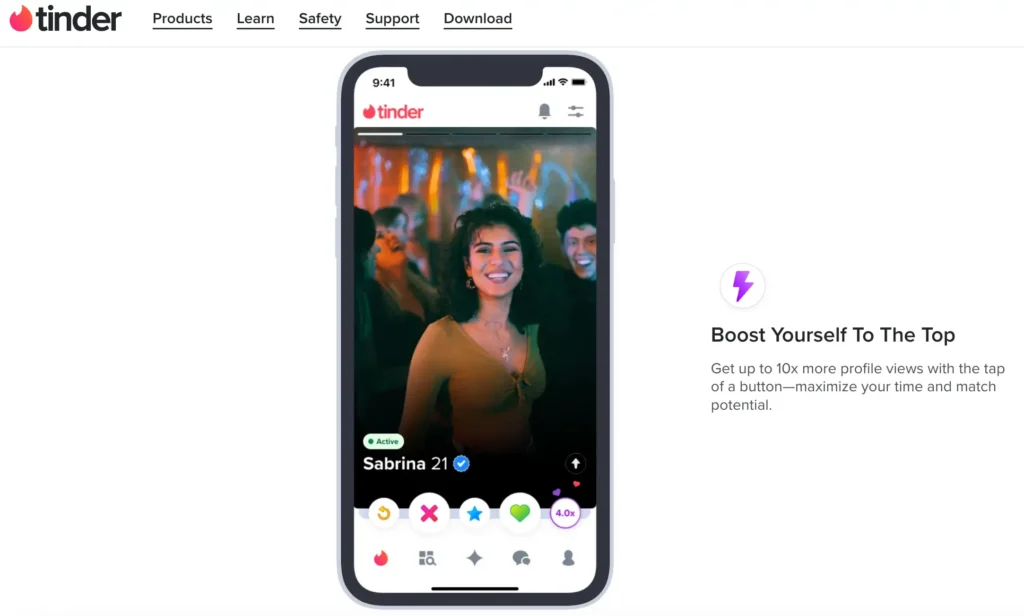
- The right swipe (Like). Swiping a card to the right or tapping the green heart records an affirmative vote.
- The left swipe (Pass). Swiping a card to the left or tapping the red cross dismisses the profile from your current deck.
- The mutual match. When two singles independently swipe right on each other, a match notification appears instantly, unlocking an encrypted two-way chat channel.
- Desktop access via Tinder Online. Logging in through a computer browser at tinder.com offers full feature parity, allowing you to swipe via keyboard arrow keys, type conversations on a full physical keyboard, and access account management tools without mobile app store markups.
The Tinder algorithm explained: dynamic scoring and deck placement
Tinder originally used an internal “Elo score” (a mathematical chess-ranking metric measuring relative profile desirability). Today, Tinder has retired static Elo ratings in favor of a dynamic machine-learning recommendation engine that evaluates real-time user behavior.
- Activity and message follow-through. The engine rewards active accounts. Logging in daily, initiating chats with mutual matches, and replying promptly keeps your profile card higher in nearby user queues. Dormant accounts are gradually pushed down the discovery stack.
- The right-swipe penalty. Swiping right indiscriminately on every single card damages your visibility. The algorithm flags a 100% right-swipe rate as automated bot behavior or low-intent spam, quietly deprioritizing your profile in local candidate decks. Maintaining a realistic swipe selectivity rate (liking between 30% and 50% of profiles) signals genuine intent and preserves account health.
- The fresh account boost. Every newly registered account receives an algorithmic visibility boost during its initial 48 to 72 hours. This period allows the system to show your card to active local daters, capture reaction metrics, and establish your profile’s baseline appeal.
- Behavioral preference clustering. The system maps your swiping habits against broader community trends, pairing you with users who share mutual aesthetic, lifestyle, and conversational interests.
Crafting an effective Tinder profile: photos, bios, and technical fixes
Because Tinder moves at high speed, your photos and written bio need to capture attention immediately.
Photo selection rules for Tinder
- The lead portrait. Your first image must be a solo portrait showing your face clearly from the chest up, with direct eye contact, clean natural lighting, and a genuine smile. Keep hats, dark sunglasses, extreme editing filters, and group photos off your first slot.
- Lifestyle and contextual shots. Use photo slots two through six to highlight active interests: cooking, playing music, outdoor hiking, athletic hobbies, or traveling.
- Why do my pictures look blurry in Tinder preview? A widespread problem is aggressive compression on uploaded photos. Tinder’s image engine heavily compresses files that do not match its native mobile container. To prevent pixelation and preview blur, crop your photos to a vertical 4:5 or 7:10 ratio with a resolution of 1080 x 1350 pixels before uploading, and avoid uploading low-resolution screenshots taken from other social apps.
High-converting bio formulas and examples
A high-converting bio provides clear conversation hooks rather than a dry list of facts:
6’2. Industrial designer by day, amateur taco critic by weekend.
Currently trying to find the best espresso bar in the neighborhood.
Tell me your most controversial travel opinion.
- The witty minimalist formula. Keep your text under three short lines, pairing your profession with an approachable, self-aware hobby.
- The situational question hook. Ending your bio with a playful debate question (such as ranking local food spots or debating travel destinations) makes it effortless for matches to start the conversation.
- The two truths and a lie template. Share two surprising real-life adventures and one subtle fabrication, challenging your matches to guess the fake story in their first message.
Navigating Tinder identity settings: changing your name and age
New users often make typographical errors during setup and wonder how to correct their basic account details.
- How to change your name on Tinder. Tinder does not allow users to edit their displayed first name directly inside profile settings after onboarding. If you signed up using a phone number, the only way to alter your displayed name is to permanently delete your account and register fresh. If your account was originally linked to Facebook, updating your first name on your Facebook profile will update Tinder after a brief data sync.
- How to change your age on Tinder. Chronological age cannot be manually edited inside profile settings once entered. If you registered with an incorrect birth date, you must delete your profile and start over, or correct the linked birth date on your connected Facebook account.
Biometric verification: how long does Tinder selfie review take?
Tinder uses a video selfie verification system to eliminate bot networks, catfish profiles, and stolen images.
- Submitting a video selfie. To earn the blue verification checkmark, users follow automated on-screen prompts to record a short video clip, turning their head in designated angles to prove physical presence.
- Selfie review turnaround. In most circumstances, automated biometric verification completes within 15 minutes to 2 hours.
- Handling extended verification delays. If your profile displays a selfie under review notice for more than 24 hours, the biometric scanner likely encountered a lighting mismatch between your uploaded portfolio photos and your live video clip. If this happens, submit an inquiry through the official Tinder Help Center or re-record your verification clip in clear, indirect natural light.
High-converting Tinder opening lines: conversation starters that work
Starting a conversation on Tinder requires moving beyond generic greetings like “Hey” or “How’s your week going?”
- Photo-specific observations. Comment on an unusual background detail in their third or fourth photo (e.g., asking if that trail was in Utah or California because the rock formations look familiar).
- Playful low-stakes debates. Open with lighthearted lifestyle arguments (e.g., asking whether ordering dessert before dinner is irresponsible or peak adulthood).
- Bio-driven questions. Pick a specific interest chip or prompt from their profile and ask an open-ended question about it rather than sending a generic compliment.
Daily like allowances, reset timers, and height filters on Tinder
Tinder restricts free accounts to a rolling daily like allowance to keep user behavior balanced.
- The free like limit. Free accounts receive approximately 50 to 100 right swipes per day, dynamically adjusted based on local market density, user age, and recent swiping patterns.
- When do Tinder likes reset? The swipe cap operates on a rolling 12-hour or 24-hour countdown clock that begins the moment your allowance runs out. The app displays an active countdown timer showing when your next likes will unlock.
- The Tinder height filter. Tinder offers an optional height filter for premium members. While free users can view height badges added voluntarily to public profiles, setting strict height preference parameters requires an active top-tier subscription.
- Unlimited swiping. Upgrading to Tinder Plus, Tinder Gold, or Tinder Platinum removes the daily swipe limit entirely.
Privacy, search, and visibility tools on Tinder
Many users wonder how much privacy Tinder provides and whether external individuals can look up their profile.
- Can you search people on Tinder? Tinder does not offer an open directory search bar where you can type an individual’s name to view their profile. To find a specific person, you must narrow your age, gender, and geographic distance filters to match their exact parameters and swipe through the local card stack.
- Does Tinder notify screenshots? Tinder does not send notifications or alerts when someone takes a screenshot of your profile, photos, bio text, or private chat logs.
- Does Tinder have read receipts? Read receipts are available on Tinder, but they are turned off by default. Users must purchase read receipts via consumable credit tokens or unlock them through top-tier premium memberships.
- Tinder Incognito Mode. Included with paid subscriptions, Incognito Mode hides your profile from the general public discovery stack, displaying your card exclusively to members you have actively swiped right on first.
- Tinder Passport Mode. A feature included in all paid subscription tiers that lets you drop your pin into any city worldwide, allowing you to match and chat with locals before traveling.
- The Tinder Double Date feature. Tinder offers a Double Date feature in select regions that lets two friends link their profiles and swipe on other pairs together. When both pairs swipe right, a four-person group chat unlocks, lowering the pressure of one-on-one small talk.
Free Tinder vs. Plus vs. Gold vs. Platinum: complete cost breakdown
Tinder is completely usable without paying, but it sells three main subscription tiers alongside its luxury Select membership and consumable tokens.
(Note: Pricing uses dynamic regional scaling based on market demand, age demographics, and app store transaction fees. Purchasing 6-month packages upfront reduces the monthly cost).
| Subscription tier | Approximate monthly cost (USD) | Core capabilities included |
| Free account | $0.00 | Standard geographic swiping, mutual matching, unlimited direct messaging with matches. |
| Tinder Plus | ~$9.99 – $14.99 / month | Unlimited likes, unlimited Rewinds (undo accidental left swipes), Passport Mode, ad-free swiping. |
| Tinder Gold | ~$24.99 – $29.99 / month | All Plus features + "Likes You" grid (see who liked you), curated Top Picks, 5 weekly Super Likes, 1 monthly Boost. |
| Tinder Platinum | ~$39.99 – $49.99 / month | All Gold features + Priority Likes (cards shown first to matches), attach a message to Super Likes before matching. |
Standalone a la carte tokens on Tinder
- Tinder Boost. Pushes your profile card to the top of the local deck for 30 minutes, best activated during peak usage hours (Sunday evenings between 7:00 PM and 10:00 PM).
- Super Likes. Delivers an immediate blue border notification on the recipient's screen, indicating deliberate interest.
- Tinder promo codes and free Gold offers. Tinder does not offer permanent free Gold memberships. Legitimate discounts are distributed through verified corporate partnerships (such as mobile carrier bundles, Student Beans verification, or seasonal in-app promotions). Third-party websites claiming to generate free Gold codes are phishing scams.
Tinder compared to alternative dating apps
Understanding where Tinder excels and where it falls short compared to rival platforms helps you invest your dating time wisely.
| Platform | Core matching dynamic | Best suited for | Key difference compared to Tinder |
| Tinder | Proximity-based swipe matching | Broad casual dating, fast matching, volume | Largest global volume; no expiration clock on matches. |
| Bumble | Timed matches + Opening Moves | Respectful casual and serious dating | Matches expire if conversation is not initiated within 24 hours. |
| Hinge | Prompt-driven likes and comments | Intentional long-term relationships | No swiping; comment directly on specific photos or text answers. |
While swipe apps excel at local dating, singles seeking international connections with background checks and verified identities often need dedicated cross-border platforms.
Troubleshooting Tinder: shadowbans, ban appeals, refunds, and scams
Because Tinder relies on automated moderation systems, users occasionally run into account restrictions or malicious profiles.
- Identifying a Tinder shadowban. A shadowban means your account appears completely normal to you, but the system has quietly suppressed your profile card from the public discovery stack. Clear signs include an immediate drop to zero matches over several weeks, messages remaining permanently unread, and zero likes in your grid despite heavy swiping in dense cities. Shadowbans are typically triggered by deleting and resetting an account repeatedly within a short window or using flagged VPN IP addresses.
- Resolving an algorithmic shadowban. Stop swiping for 72 hours, ensure your profile completes video selfie verification, or submit an inquiry through the official Tinder Help Center (help.tinder.com).
- Official ban appeals. Tinder maintains a formal appeal portal (appeals.tinder.com). If banned, log in with your linked phone number, review the community guideline violation cited, and submit an appeal for human review.
- Recognizing common Tinder scams. Watch out for crypto investment solicitations, requests for financial aid during fabricated emergencies, or external links redirecting to third-party verification sites. Legitimate matches will never ask for money or external registration codes.
- Checking platform status: is Tinder down? If your matches fail to load or messaging freezes, check third-party status monitors like Downdetector or Tinder's official Twitter/X status feed to verify if server outages are taking place.
- Requesting a Tinder refund. Refunds must be requested through the platform where the payment occurred. For iOS purchases, submit a refund request via Apple's reporting portal (reportaproblem.apple.com). For Android or direct web purchases, submit a refund ticket through Tinder Customer Support within 14 days of transaction processing.
How to pause, cancel subscriptions, or delete your Tinder account permanently
Simply uninstalling the Tinder app from your phone does not cancel recurring charges and does not remove your profile card from local discovery stacks.
How to cancel a Tinder subscription
- Apple iOS (iPhone). Open iPhone Settings > tap your Apple ID > Subscriptions > tap Tinder > select Cancel Subscription.
- Android (Google Play). Open Google Play Store > tap your profile icon > Payments & subscriptions > Subscriptions > select Tinder > tap Cancel.
- Tinder Online (Web). Log in at tinder.com > click your profile avatar > open Manage Account > select Cancel Subscription.
How to pause your Tinder account temporarily
If you want to step away without losing your matches and chat logs:
- Open Tinder and navigate to Settings.
- Scroll to the Show Me on Tinder toggle.
- Switch the toggle to Off. Your profile will immediately vanish from public discovery decks, but you can continue chatting with existing matches.
How to delete your Tinder account permanently
To permanently erase your profile, photos, matches, and message history, complete the following steps:
- Open the Tinder app or log in via tinder.com.
- Tap your Profile icon and select the Settings gear.
- Scroll to the very bottom and tap Delete Account.
- The app will offer an option to pause your account instead. Select Delete My Account a second time.
- Select a reason for leaving and confirm the final deletion prompt.
- Your profile, message history, uploaded pictures, and swipe data will be permanently purged from Tinder's production servers.
Is Tinder worth using?
Tinder remains an indispensable dating platform due to its unmatched user numbers and global reach. Its fast-paced swipe mechanics and responsive interface make it the most accessible tool for meeting singles in your immediate area.
The platform provides a fully functional free experience. You do not need to purchase Tinder Plus, Gold, or Platinum to match, chat, and set up real-world dates. While upgrades like Passport Mode and the "Likes You" grid provide genuine convenience for regular travelers and busy professionals, they remain entirely optional.
If you are looking for an active dating platform with maximum candidate volume and understand how to present yourself visually, Tinder is an essential app to keep in your rotation. For daters seeking structured international alternatives with verified member screening, explore our comprehensive guide on finding secure international dating platforms with verified profiles before committing your long-term dating budget.